• Home
  • Contact
  • Got Apps?
  • Subscribe
    • RSS Atom Feed
    • Comments Feed
  • FAQs
    • Mac360′s FAQs
    • Bambi’s FAQs
    • Tera’s FAQs
  • About
    • About Mac360
    • Copyright Notice
    • Privacy Policy
    • Service Terms Agreement
  • Writers
    • Alexis Kayhill
    • Bambi Brannan
    • Carol Miller
    • Jack Miller
    • Jeffrey Mincey
    • Kate MacKenzie
    • Natalia Nowak
    • Ron McElfresh
    • Tera Patricks
    • Wil Gomez
  • Archive
    • Complete Archive
    • Cheap Mac Apps
    • Mac App Reviews
    • Tips and Tricks
    • News and Comment
  • Mac360 on Twitter

Mac360

Mac App Reviews & Apple News

  • Home
  • Cheap Apps
  • App Reviews
  • Tips & Tricks
  • News & Comment
  • Mac Blogs
    • Bohemian Boomer
    • McElfresh.org
    • McSolo
    • NoodleMac
    • PixoBebo
    • TeraTalks
  • Thursday, May 17, 2012
Home » Cheap Mac Apps » 3 Ways This Mac Alarm And Timer Manager Is Better

3 Ways This Mac Alarm And Timer Manager Is Better

By Ron McElfresh - Thursday, July 14, 2011

ChronoSliderMy two greatest secrets to productivity—beyond my Mac and iPhone—are simple. A couple of pairs of glasses in every room. And half a dozen timers scattered around the house. Simple, right?

No matter which room I’m in, I can see. No matter which room I’m in, there’s a timer nearby. Yes, my Mac also has half a dozen timers. Easy timers. Complex timers. Lots of timers. I collect timers.

How Much Is That Timer In The Window?

For me, timers are any easy, and sometimes portable, way to remember when something needs to get done. Those little wind up egg timers work great, and I use them, but they all have one flaw.

Timers remember to alert you that something needs to get done, but don’t tell you what it is.

The timers on my Mac and iPhone do both.

The latest cool little timer to grace my Mac’s screen is ChronoSlider. It lets you set alarms and timers with a couple of mouse clicks. And, it bares an interface that dares to Think Different™.

ChronoSlider resides in your Mac’s Menubar, so you’re a mere click away from invoking a new timer.
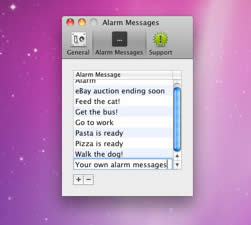
ChronoSlider

Big whoop, right? Plenty of Mac timers do the same thing.

ChronoSlider’s preferences let you set hot keys so you don’t even need to click the mouse.
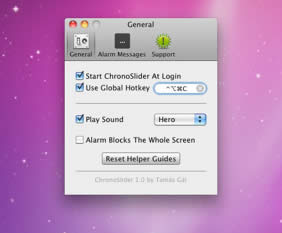
ChronoSlider Prefs

Again, whoppsie doo. Nothing special.

Here’s where ChronoSlider takes a different approach. Hot spots on the screen. Click on a hot spot and you can add a new timer. Set the time and you’re good to go.
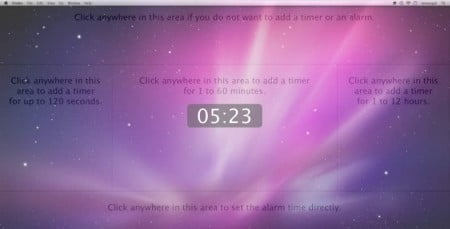
ChronoSlider Hot Spots

The left area on the screen sets a timer for up to 120 seconds. The right area sets a timer for anywhere from one hour to 12 hours.

The center timer area adds a timer for one to 60 minutes.

Timers are simple and easy to set up and each one can have a different message (unlike the egg timer which works well, but doesn’t tell you what the alarm is).

An alarm can also become a recurring reminder, but there’s no snooze alarm. That would be a good addition.

ChronoSlider is available on the Mac App Store, but there’s also a try-before-you-buy option from the developer’s site. As timers go, this one is better because it’s inexpensive, does repeat alarms, and is notably easier to use.

What? Me? Follow?

Finally, have you visited our sponsor overlords? When you do our pre-schoolers can stop hanging around 7-11 begging for food. Did you know our daily reviews, news, updates, and nonsense come right to you when you Follow Mac360 on Twitter? They do. Now you know.

About Ron McElfresh

My first Mac was the 128k model (from 1984, so I'm old). I live and work in Honolulu, Hawaii. Read more Mac stuff on McSolo, and check out certified Mac mini App Reviews on NoodleMac, or nonsense on McElfresh.org.


« Nextly How To Move, Resize, Organize A Mac’s Windows
Previously » Dinosaur Alert! A Mac App Tracks Library Books

Mac360's Comment Policy: Keep your comment on topic, relevant, worthy, and funny. Or, pick any three. Be pleasant, helpful, and only use your real name. Comments are moderated and will not appear immediately.

Post Your Comment on Mac360 Cancel reply

*

*

CAPTCHA Image
Refresh Image

*

Recently on Mac360

  • Got Gmail? Get Gmail Into Your Mac’s Menubar For Instant Email Access And Alerts
  • How To Use Your Mac To Improve Your Typing Skills (or, teach you how to type)
  • Feed Your Mac A Video And Let A Magic App Convert It For iTunes Automatically
  • Learn To Draw On Your Mac With A Free Pixel Art Editor And Become A Pixel Pusher
  • How Tracking Your Diet With A Mac App Can Be Perfect Fun (or, not so much)

Links of Interest

  • Mac Recovery Software
  • Mac Video Games
  • Discount Drugs
  • Fisher Investments Videos
  • Best Buy Coupon Codes 2012
  • Rent iPads
  • Printing by PrintLIon.com
  • Norton Antivirus

What We Read

  • Bohemian Boomer
  • Daring Fireball
  • Feeling Lucky?
  • HawaiiBlogger
  • HawaiiCam
  • Hillaryzilla
  • Low End Mac
  • MacDailyNews
  • MacObserver
  • McSolo
  • NoodleMac
  • Obama's Diary
  • OnoDining
  • PixoBebo
  • Sarah's Diary
  • TeraTalks

Blasts from the Past

  • Got Gmail? Get Gmail Into Your Mac’s Menubar For Instant Email Access And Alerts » Not every Mac user has Gmail, but there's an app that makes Gmail more fun to use. Instead of hav...
  • How To Use Your Mac To Improve Your Typing Skills (or, teach you how to type) » Other than family and religion, typing is my life. I slave over a hot keyboard all day and county my...
  • Feed Your Mac A Video And Let A Magic App Convert It For iTunes Automatically » Chances are good you have plenty of videos. If not iMovie clips, then TV shows or movies you've down...

Follow Mac360 on Twitter

  • "6 Ways To Love Pixel Tools On Your Mac (1, it's cheap, and 2, you need it) - http://t.co/P4ibRcMP #Mac #Apple about 1 hour ago
  • "I Won't Buy An Apple Television Unless It Has This Magical Ingredient" - http://t.co/Xga2elG3 #Apple #Mac about 2 hours ago
  • "A Visual Way To Use Your Mac To Organize Files, Notes, And Your Brain" - http://t.co/8qPZkgxR #Mac #Apple about 4 hours ago
  • "How To Use Your Mac To Turn Digital Photos Into Moku Hanga On The Cheap (hint: wood block printing)" - http://t.co/akbTDvQp #Mac #Apple about 5 hours ago

Comments to Mac360

  • Casey Stallworth on How To Use Your Mac To Turn Digital Photos Into Moku Hanga On The Cheap (hint: wood block printing)
  • Tom Hammer on How To Use Your Mac To Turn Digital Photos Into Moku Hanga On The Cheap (hint: wood block printing)
  • shawn on The Top 7 Macs Of All Time: Read It And Weep
  • Martin Grant on How To Use The Menubar To Navigate Your Mac’s Folders With A Click
  • robyn on How To Use The Menubar To Navigate Your Mac’s Folders With A Click

Return to top of page

Copyright © 2004 - 2012 Ron McElfresh, Honolulu, HI. All. Rights. Reserved.