Mac360

Apple • Mac • iPhone • iPad • News

  • Home
  • News
  • App Reviews
    • iOS App Reviews
    • Cheap Mac Apps
    • Mac App Reviews
    • Mac Tips & Tricks
  • Archive
    • iOS App Reviews
    • Cheap Mac Apps
    • Mac App Reviews
    • Mac Tips and Tricks
    • News and Comment
  • About
    • Contact Mac360
    • About Mac360
    • Mac360′s FAQs
    • Got Apps For Us?
    • Privacy Policy
    • Service Terms Agreement
    • Copyright Notice
  • Follow
    • RSS Atom Feed
    • Comments Feed
    • Facebook
    • Twitter
  • Writers
    • Alexis Kayhill
    • Bambi Brannan
    • Carol Miller
    • Jack Miller
    • Jeffrey Mincey
    • Kate MacKenzie
    • Natalia Nowak
    • Ron McElfresh
    • Tera Patricks
    • Wil Gomez
  • Blogs
    • Bohemian Boomer
    • McSolo
    • NoodleMac
    • PixoBebo
    • TeraTalks
  • Sitemap
  • Wednesday, June 19, 2013

An Old Mac Text Editor I Don’t Need But Can’t Throw Away

Wednesday, February 8, 2012 | Ron McElfresh Posted In Tips and Tricks

Tex-Edit PlusPurging my Mac of unused apps is not easy. A little digital housecleaning is a good thing, but I have files and apps that I’m not always willing to say goodbye to.

Take Mac text editors. Please. I have a dozen but use one about 80-percent of the time. Another gets used 10-percent of the time. The other 10 get fired up about once a year. Or less. This is the story of a good text editor-cum-word-processor that’s still easy to use, difficult to discard.

Blast From The Editor Past

Somewhere back in the last century I began to use Tex-Edit Plus on my Mac. It was not as cumbersome or complex as the venerable BBEdit.

Tex-Edit back then was stuck somewhere between SimpleText and a real word processor, good for quick edits and simple documents.

If my rapidly depleting brain cells are an accurate reflection of history, Tex-Edit was true shareware. Use it, or use it and donate some money if you were so inclined.

Tex-Edit Plus is the 21st century incarnation of a decent editor but now with a price tag.

The value is that Tex-Edit, unlike many editors or word processors, is scriptable, a full on ASCII text editor that also speaks AppleScript, Automator, and cleans up messy text in your spare time.

Don’t be fooled by the boringly stark interface. All the power comes from the floating palettes.

Tex-Edit Plus

The two floating palettes give you quick access to built-in editing Tools (typical word processing tools in a mostly 1999 look and feel) to Script Tools (self explanatory for AppleScript junkies).

Preferences are extensive, including Global options for menus, version checking, and unit measurements. Dozens of other options are available on a per document basis, including Tabs, Save options, Printing, even Speech.
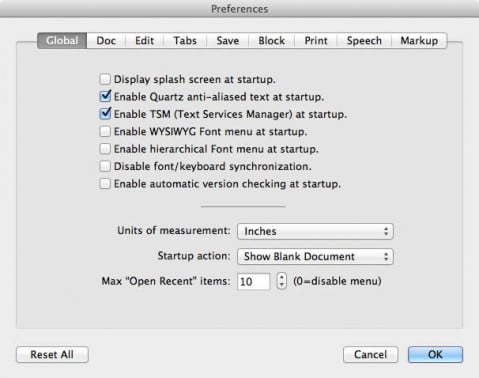
Tex-Edit Preferences

Yes, Tex-Edit Plus is Mac speech aware with usable controls for your Mac’s built-in voices.

For example, select the voice from the drop down menu. Then select Voice Pitch, Speech Rate, even Modulation.

Tex-Edit goes smoothly from simple word processor to utility editor to speech maker.

If you’ve never ventured into scripting on your Mac, Tex-Edit is a good way to get started with dozens of built-in Automator actions, AppleScript recordability, and plenty AppleScripts in the Tex-Edit Plus Archives.

There’s not much to not like. Tex-Edit is still true shareware after all these years. Negatives? A few. It’s not a pretty, modern-looking, 21st century-like app. The feel is old school but the utility is substantial. You definitely get what you pay for.

Listen to an audio version of this article:

Try A Related Article

  • The App For Mac Users Only: The World’s Best Free Text Editor Is Loaded With Features
  • Throw Away Your Text Editor Or Word Processor; Think Different, Write Different With Folding Text
  • This Free Mac Text Editor, The Best Value On The Planet, Just Got Better
  • Finally, A Mac Web Page Editor That’s Easy To Use
  • The Easy Way To Save Money And Edit PDF Files The Non-Adobe Way

Our Apple Village Peeps

Kate compares Microsoft Office vs. Apple’s iWork Trio: How The Cloud Levels The Playing Field. But is anyone making any dough? Say, What’s The Better Way To Browse Photos On Flickr? Use The Free Mac App F-Stop. It's very cool.

Elsewhere, Tera has the scoop on A Cheap iPhone With Cheap Colors Coming To A Store Near You. Jeffrey asks the musical question, Whatever Happened To iRadio? And Why Is iTunes Radio Better Than A Subscription? I don't know, either. Finally, Here’s The Easy, Free Way To Track The News From Major Newspapers In The U.S. An RSS reader is better.

Regift Us

Our thousands of app reviews and colorful commentary are supported by your devoted attention to the nearby overlording sponsors and their messages of promise. Visiting an aforementioned sponsor's premise today helps us to keep moist. When you help out by giving attention to any sponsor during today's visit we're able to afford hot water at McDonalds (just add catsup for tomato soup). Hence, we appreciate your brief visits to these necessary overlords.

About Ron McElfresh

My first Mac was the 128k model (from 1984, so I'm old). I live and work in Honolulu, Hawaii. Read more of my articles here. Read more Mac stuff on McSolo, and check out certified Mac mini App Reviews on NoodleMac, or nonsense on McElfresh.org.

« Next Article
7 Ways To Enhance Photos On Your Mac With The Photo App Value Of The Year
Previous Article »
8 Ways to Love Digital Proof Sheets For The Mac Photographer

Comments

  1. IanG says:
    Thursday, February 9, 2012 at 11:48 AM

    Been using it for years. I like it much better than TextEdit, and use it for everything except *important stuff*, where I go with InDesign. The cleanup tools are very useful.

  2. willis says:
    Thursday, February 9, 2012 at 6:26 PM

    This is an underrated app that’s been on my Mac for many years. It just works. It’s a mini word processor, a script editor, a text editor, all rolled into a Swiss Army Knife of utility.

    And you’re right. It’s one I don’t use often, but won’t throw away. And it’s priced right as pure shareware.

    • Raymond says:
      Friday, February 24, 2012 at 7:33 PM

      I like your idea for zpnpiig and sending the newest website files.I think some combination of Automator and AppleScript is a pretty neat balance. Since my only experience with Unix is through Mac OS X, I know next to nothing about shell scripting. I did my share of batch files in the Windows world. Are they similar? Which is harder to learn AppleScript or bash?I’ve come to really appreciate the Mac platform. The more I use it, the more I like it. Don’t get me wrong Windows does what it’s supposed to do. I think the biggest thing I like about the Mac OS itself is not having to tinker with everything to get it to work right, which is something that is just part of the Windows world. Time Machine is handy, and I’m not above admitting I like the eye candy of OS X.

  3. Tom Bender says:
    Friday, February 10, 2012 at 1:49 AM

    Hello, and thank you for the kind words concerning my little application. It’s fun to work on, even though it’s old like me.

    Hopefully, Apple will see fit to support AppleScript well into the future, although I’m not so sure. It’s becoming difficult to find Lion apps that support even basic recordability.

    Also, I noticed that you owned a 128K Mac, as did I. Good times!

  4. Bill Dyckes says:
    Monday, February 13, 2012 at 5:22 AM

    TexEdit’s applescript is so much easier to use than any of Apple’s own word processing program. I keep putting off moving to Lion because TexEdit is so useful and I haven’t found anything to replace it.
    Why can’t Apple give decent support to its own products?

Recently on Mac360

  • Bored With OS X Mountain Lion? Can’t Wait For OS X Mavericks? Add Flavours To Your Mac Now
  • The Secret Sauce In Apple’s New MacBook Air Is What You Want But Did Not Expect To See
  • Everything That’s Missing From Apple’s New Black Aluminum Beast Mac Pro
  • Surprise! Expecting Black And White And Flat All Over In iOS 7? It’s Pastel, Neon, And Depth
  • Here’s The New Way To Use Your Mac To Schedule Officially Sanctioned Coffee Breaks
  • Cheap Mac Paint Apps, Pt. 2: Paint X Digital Drawing And Design For The Price Of Lunch
  • Cheap Mac Paint Apps, Pt. 1: Paint Pro Digital Drawing And Design For The Price Of Coffee
  • Free: How To Do To Email What Your Mac Already Does To Email But Do It Differently
  • How To Get Your Mac To Give You A Relaxing Back Massage And Help You Sleep Better At Night
  • The New Way To Focus Photos In Your Camera Is To Focus After You Take The Shot
  • Got The Email Blues With Apple’s Mail? Ready For Something Different? 12 Ways To Like Airmail
  • How Much Time Do You Spend On Each Mac App Each Day? Here’s The App That Knows
  • And One More Thing I Need To Mention To Google’s CEO About Consistency
  • What’s The Best iPhone Todo List App That Money Cannot Buy (that’s better than Reminders)?

Follow Mac360

Follow Mac360 on FacebookFollow Mac360 via RSSFollow Mac360 on Twitter

Apple Villagers

  • Bohemian Boomer
  • McSolo
  • NoodleMac
  • PixoBebo
  • TeraTalks

Return to top of page

Copyright © 2004 - 2013 Ron McElfresh, Honolulu, HI. All. Rights. Reserved.

Mac360 Sitemap | Mac360 on Twitter | Mac360 on Facebook.